
Salesforce Article: https://help.salesforce.com/s/articleView?id=sfdo.npsp_get_started_with_nonprofit_cloud.htm&language=en_US&type=5
Design questions
- Eligible nonprofits receive their first 10 licenses of Nonprofit Cloud (or Sales/Service Cloud) absolutely free
- Understanding of donor tracking and fundraising
- What integration required
- Set fiscal year in Salesforce org settings before any data migration — changing it later breaks rollups.
Migration order matters:
- Accounts (Households) first
- Contacts second (linked to Accounts)
- Opportunities (donations) third
- Payment records fourth
- Relationships and affiliations last
| Package | Cost | Purpose |
|---|---|---|
| NPSP | Free | Core nonprofit CRM |
| PMM (Program Management Module) | Free | Program delivery tracking |
| Outbound Funds Module | Free | Grants given out |
| Volunteers for Salesforce | Free | Volunteer management |
| Amp Impact | Paid | Advanced grant management |
| Classy for Salesforce | Free connector | Online fundraising |
| Accounting Subledger | Paid | Financial reconciliation |
NPSP / NPC Giving Types — Mistakes & Corrections
Key reference for Salesforce nonprofit implementations. Use this to configure giving types correctly from day one.
| Giving type | Object in NPSP/NPC | Common mistake | Correction |
|---|---|---|---|
| One-time donation | Opportunity |
Mistake Using the default record type instead of a dedicated Donation record type — breaks rollups and reports. |
Correction Create a Donation record type on Opportunity. Map it in NPSP Settings under Opportunity record types. Confirm it triggers NPSP rollup fields correctly in sandbox before go-live. |
| Pledge | Opportunity + Payments |
Mistake Creating the Opportunity but skipping installment payment records — giving total shows correctly but cash flow is invisible. |
Correction Use NPSP’s OppPayment object to create an installment schedule. Set individual payment dates, amounts, and statuses. Track Write-offs separately for unfulfilled pledges. |
| Recurring gift | Recurring Donation |
Mistake Creating the Recurring Donation record but not connecting it to the payment gateway token — charges never process automatically. |
Correction Complete the full gateway integration loop: Recurring Donation → gateway token → test a live charge in sandbox. Configure failed payment retry logic and set up lapsed donor alerts via Flow. |
| Soft credit | OCR + Partial Soft Credit |
Mistake Skipping Opportunity Contact Role setup — soft credits never generate, major donors lose recognition on attributed gifts. |
Correction Configure OCR roles in NPSP Settings (Soft Credit Roles). Verify relationship types map to those roles. Run Recalculate Rollups batch after setup. Test with a sample family gift before data migration. |
| In-kind gift | Opportunity (custom) |
Mistake No fair market value (FMV) field — finance team can’t report on non-cash contributions for audits or IRS Form 990. |
Correction Add a Fair Market Value currency field and a Description of Gift text field to the In-Kind record type. Exclude In-Kind from monetary rollups using record type filters so totals stay accurate. |
| Grant received | Opportunity (grant type) |
Mistake No reporting milestone tracking — org misses funder report deadlines, risking grant renewal. |
Correction Add custom Report Due Date and Report Submitted Date fields. Build a Flow to create a Task reminder 30 days before each deadline. Use a Grant Pipeline report to surface all open deadlines. |
| Grant given out | Outbound Funds Module |
Mistake Tracking outbound grants as Donations or Opportunities — data model breaks, funder and grantee relationships become impossible to report on. |
Correction Install the free Outbound Funds Module from AppExchange. Use Funding Request, Funding Program, and Disbursement objects — purpose-built for this. Never repurpose Opportunity for money going out. |
| Matching gift Bonus | Opportunity + Soft Credit |
Mistake Recording the employer match as a separate unlinked Opportunity — loses the connection to the original donor gift and breaks matching gift reporting. |
Correction Link the employer match Opportunity to the original gift via Soft Credit on the employer Account. Use the Matching Gift fields on the original Opportunity to track status (Submitted, Pending, Received). Report on both together. |
NPSP Implementation Topic
Matching Gift
- Create Account with RT = Organization with field “Matching Gift Company” = true
- Create Opportunity under Account with RT = Matching Gift and amount and closed won [Employee]
- Create Opportunity with RT = Donation under account with fields: [Employer]
- Matching Gift Account = AccountId
- Matching Gift Employe = AccountId
- Matching Gift = Opp.Id in last step
Soft Credit (recognition of credit for donations)
- Account.Account Soft Credit store the amount. This is populated by nightly job by NPSP
- Contacts are added under affliated contact related list under Account
- Opp is created with RT = Matching Gift
- Then go to related list, and create one record of Account Soft Credit. We can select full or partial credit here
- Most soft credits use an Opportunity Contact Role (OCR)
Part 1 — How NPSP handles Soft Credits
“In NPSP, Soft Credits give recognition to a Contact for a gift they didn’t make themselves but influenced or is attributed to them. The mechanism works through Opportunity Contact Roles — when you assign a Contact an OCR on an Opportunity with a role like ‘Soft Credit’, ‘Household Member’, or ‘Influencer’, NPSP creates a Partial Soft Credit record behind the scenes and rolls that amount up to the Contact’s giving summary fields like npo02__Soft_Credit_Total__c.
So the flow is: Opportunity → OCR with soft credit role → NPSP creates Partial Soft Credit record → rollup updates Contact’s soft credit total.”
Part 2 — Where standard OCRs are NOT sufficient
“Standard OCRs break down in two common real-world scenarios:
Scenario 1 — Split credits between multiple people Imagine a $10,000 gift from a Foundation, but two major gift officers both worked on cultivating the relationship — one did 70% of the work, one did 30%. A standard OCR gives full $10,000 credit to both, which double-counts and makes performance reporting meaningless. You need Partial Soft Credits where you assign specific amounts — $7,000 to one officer, $3,000 to the other — so the numbers actually add up correctly.
Scenario 2 — Household member recognition A husband makes a $50,000 donation. The wife is equally important to the relationship but made no gift herself. A standard OCR gives her a full $50,000 soft credit — which is fine for recognition, but if you’re trying to report on her actual philanthropic influence separately from her husband’s, the data becomes messy. In major gifts programs with moves management, you need to track each household member’s engagement and attributed giving independently, which standard OCRs alone can’t cleanly support.”*
Complex grant management process
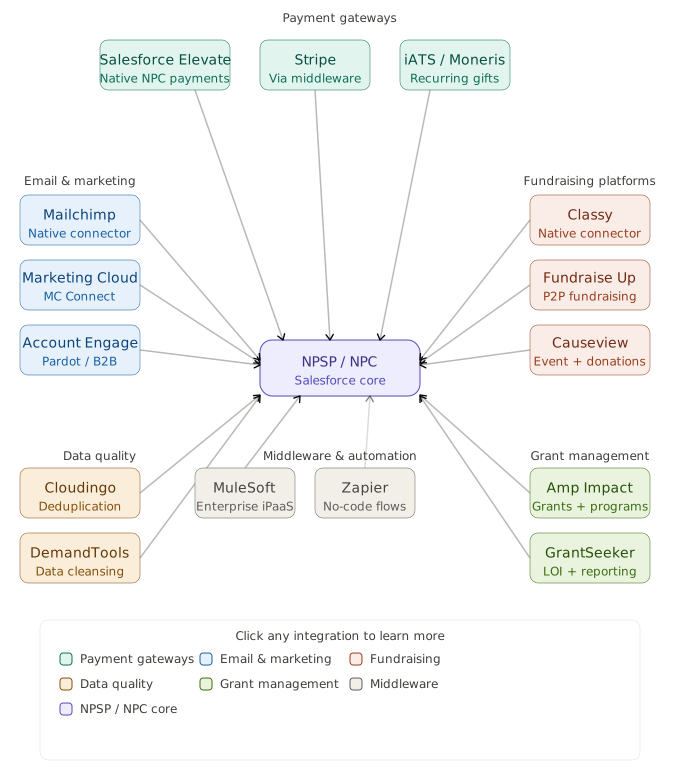
- Buy managed package – Grant Management <== Salesforce, or GrantSeeker
- Or build your own using custom object + Opp object
Payment gateway integration
- Salesforce Elevate (native, tight NPC integration)
- Third-party like ==> Stripe + a middleware, Salsa Engage etc
Data quality and deduplication in a large NPSP org with 100k+ records
- Built-in duplicate matching rules, Salesforce Duplicate Management
- Third-party tools like Cloudingo or DemandTools
Accordion item6
This is a placeholder tab content. It is important to have the necessary information in the block, but at this stage, it is just a placeholder to help you visualise how the content is displayed. Feel free to edit this with your actual content.
Enterprise Architecture
FAQs
Question 1:
“A nonprofit client comes to you mid-project. Their NPSP Soft Credits are not calculating correctly — major donors are missing soft credit recognition on gifts made by their family members. The client has a gala in 3 weeks and needs donor recognition reports to be accurate before then. How do you diagnose and fix this?”
Answer:
- Pull report and understand problem
- Opportunity Contact Roles. Soft Credits in NPSP are driven by OCRs. I’d check whether the family member Contacts have OCRs on the relevant Opportunities, and whether the Role matches what’s configured in NPSP Settings under Soft Credits.
- NPSP Relationship settings. I’d verify that the relationship type between the donor and family members is mapped correctly in the NPSP Relationships configuration — if the relationship type isn’t recognized, soft credits won’t generate.
- Rollup failures. I’d check the NPSP Error Log for any failed rollup jobs, and check if the Customizable Rollups engine is enabled and configured correctly.
- Automation conflicts. I’d look for any Flows or triggers that might be overwriting OCRs after insert.